
how to add items to the arraylist using an add method
ArrayList provides two methods to add items. These methods are Add and AddRange. Add method is used to store either be string, numeric or any custom objects into the ArrayList. In the code given below, we add customer names of string type to the ArrayList.
ArrayList also supports AddRange method to add items to the ArrayList. Using Add method we can add only one item at a time. But AddRange method allows us to add multiple items at a time into the ArrayList.
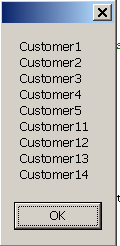
The picture given below is the result of the above code.
private void Form1_Load(object sender, EventArgs e)
{
	ArrayList arrayList = new ArrayList();
	arrayList.Add("Customer1");
	arrayList.Add("Customer2");
	arrayList.Add("Customer3");
	arrayList.Add("Customer4");
	arrayList.Add("Customer5");
The below code demonstrates how to add multiple items into the ArrayList using AddRange() method.
string[] items = new string[]{ "Customer11","Customer12","Customer13","Customer14"};
arrayList.AddRange(items);
string str = string.Empty;
IEnumerator enumerator = arrayList.GetEnumerator();
while (enumerator.MoveNext())
{
str += enumerator.Current.ToString() + "\n";
}
MessageBox.Show(str);
}
ArrayList also supports AddRange method to add items to the ArrayList. Using Add method we can add only one item at a time. But AddRange method allows us to add multiple items at a time into the ArrayList.
The picture given below is the result of the above code.
Most Viewed