Procedure OverLoading in vb.net
Defining of many procedures using the same name having different argument lists is known as Procedure Overloading. We can overload a procedure to define similar procedures without giving each one of them a different name. We overload a procedure by providing a different argument list for each procedure. Each overloaded procedure uses the same procedure name. Each overloaded procedure differs from other overloaded procedures in following ways:
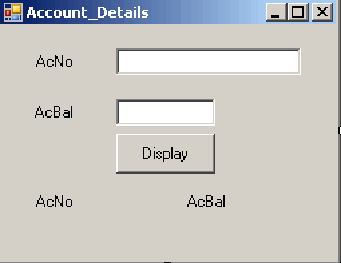
The following example demonstrates the use of overloading a procedure. To execute the following code, we need to create a form and name it as Account_Details. Add two textboxes and one button. We set the button name to btnDisplay and the text of the button to Display. To specify the caption for the form, we should set the Text property of the form to Account Details. In addition, we need to have two labels indicating the data to be entered in the corresponding text boxes and two other labels to display the results of clicking the display button. To execute the code, we place the controls as shown in the Fig given below.
- The procedure modifiers, such as Public, Shared and Static.
- The argument names.
- The argument modifiers, such as ByRef and Optional.
- The data type of the return value.
The following example demonstrates the use of overloading a procedure. To execute the following code, we need to create a form and name it as Account_Details. Add two textboxes and one button. We set the button name to btnDisplay and the text of the button to Display. To specify the caption for the form, we should set the Text property of the form to Account Details. In addition, we need to have two labels indicating the data to be entered in the corresponding text boxes and two other labels to display the results of clicking the display button. To execute the code, we place the controls as shown in the Fig given below.
Public Class Account_Details
Dim strAcNo As String
Dim dblAcBal As Double
Private Sub btnDisplay_Click(ByVal sender As System.Object,
	ByVal e As System.EventArgs) Handles btnDisplay.Click
		If txtNo.Text <> "" And Val(txtBal.Text) <> 0 Then
			strAcNo = txtNo.Text
			dblAcBal = txtBal.Text
			Call DisplayData(strAcNo)
			Call DisplayData(dblAcBal)
		Else
			MessageBox.Show("Please Enter Data")
		End If
	End Sub
Public Overloads Sub DisplayData(ByVal AcNo As String)
	lblAcNo.Text = AcNo
End Sub
Public Overloads Sub DisplayData(ByVal AcBal As Double)
	lblAcBal.Text = AcBal.ToString()
End Sub
End Class