
connection string for connecting to data sources

A connection string (hereafter CS) is a string which is used to gain access to different data sources from a VB .Net or a C# .Net application.
The data sources can be MS SQL Server, MS Access or SQL Server on remote server.
It is made of many parts and one of them is the Provider. A provider allows us to specify the driver which can access the datasource in binary form. With the provider, we can setup a connection from an application and gain access to the datasource.
We specify the appropriate provider depending on the datasource we wish to access. Note that when we need to connect to sql server we need not mention the provider in the CS. You will see this, when we write the CS for connecting a VB. Net application or C# application to an Sql Server database.
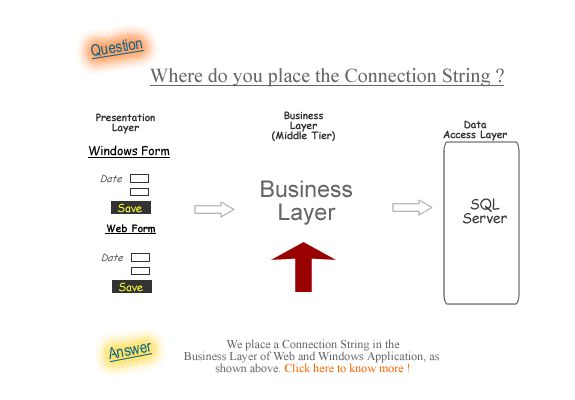
connection string in a n-tier application
All commercial applications are designed based on the N-Tier concept. Which simply means partitoning your application into components.Where does CS fit in a tier based application.
The picture given shows where you should place the CS in your application.
CS to connect to sql server database
VBGiven below is the CS for connecting a Visual Basic. Net application to an Sql Server database.
Dim conString As String = "Data Source=SYS2;" +"integrated security=SSPI;" + "database=FinAccounting"
C#
Given below is the CS for connecting a C#. Net application to an Sql Server database.
string conString = "Data Source=SYS2;" + "integrated security=SSPI;" + "database=FinAccounting";

In the above example, Data Source is the machine name of the computer that is running sql server, in this case SYS2. 'Integrated security' indicates that current user's windows credentials (username and password) are being used to access and connect to sql server.
The possible values for Integrated Security are 'true', 'yes', and 'sspi', which specify a secure connection.
In the above code, 'database' refers to the name of the specific database that we would like to access. A CS also has other properties like connection pooling, length of timeout period and security options.
Note that we can use and implement a connection string without using these other properties. CS is a property of the connection object. While using the CS, we need to instantiate the Connection object. We will see how to do this in the coming topic.
CS to connect to a Microsoft access database
To connect to a Microsoft access database, use the following CS.Dim myConn As OleDbConnection = New OleDbConnection () MyConn.ConnectionString = "Provider = Microsoft.Jet.OLEDB.4.0; Data " & _ "Source = C : \ data \ northwind.mdb ; User Id = guest; " & _ "Password = isw3083"
Observe that in the above code, we have specified a provider name in the connection string. We need to do this when we use a OLEDB .Net data provider.
Giving away username and password in the code vulnerable to phishing. An option to overcome this problem is by using the Windows integrated security. Consider the following code.
<br /><br />
string conString = "Data Source=SYS2;" + "integrated security=SSPI;" + "database=FinAccounting";
<br /><br />
If you are searching for information on how to connect to various databases such as sql server, oracle, excel, access and mySql visit this site - connectionstrings
connection string to connect to sql server database which is on a remote server
Below is an example code to access a sql server database which is on the remote web server on the internet, using C# code in an .aspx file.<br /><br /> string conString = "Data Source=201.73.323.39;database=FinAccounting;User<br /> ID=sssabc123;Password=scss456;";<br /> <br /><br />
In the above code, we assign the IP address of the server to the 'Data Source', assign the name of the database, assign the username and the password.
The above code is used to connect to a database hosted on a web server.
Let us see, what is a connection object, as the connection string is a property of the Connection Object.
connection object
The Connection object establishes a connection to the database. Two of the most common Connection objects used are OleDbConnection and SqlConnection.Both the SqlConnection and OleDbConnection are namespaces and are inherited from the IdbConnection object.
The commonly used property of the Connection object is the Connection string property.
ConnectionString property
This property is used to provide information, such as the data source and database name, that is used to establish the connection with the database.
There are two ways of setting the CS property.
- Using a parameterized Constructor
- Using the default constructor
setting the CS property using a parameterized Constructor
visual basic
Imports System.Data
 Imports System.Data.SqlClient
 Public Sub GetData()
   Dim conString As String = "Data Source=SYS2;" +
   "integrated security=SSPI;" + "database=FinAccounting"
   Dim myConnection As Sqlconnection =
     New SqlConnection(connectionString)
   myConnection.Open()
 End Sub
setting the CS property using the default constructor
In this method, we use the default constructor and then later set the ConnectionString property separately.
visual basic
 Imports System.Data
 Imports System.Data.SqlClient
 Public Sub GetData()
  Dim myConnection As Sqlconnection
   = New SqlConnection()
  myConnection.ConnectionString="Data Source=SYS2;"
  + "integrated security=SSPI;"
   + "database=FinAccounting"
  myConnection.Open()
End Sub
Note that the CS must always be set before the connection is opened, and cannot be changed after it is open.
storing CS in a APP.config file
The CS contains sensitive data like username, password, IP address of the server. When we place this sensitive data in an .aspx file for a web application or visual basic or C# files, we run the risk of exposing this data to a hacker.
So, we place this code in the application configuration files. Configuration files are used to store information about application settings. These files are also referred to as Application Configuration Files and provide security to the data contained in them.
We place the CS in App.config file for windows applications and web.config file for web applications.
After we write the data source information in a program, it will be difficult to change the data source information.
If we do so, it will create problems when we deploy the programs from test server to production servers.
Till .Net was released this information was stored in .ini files or in system registry.
It is not an easy job to open the registry, locate entries and make appropriate changes. .NET gives a simple and easy solution for this problem - the Application Configuration File.
app.config files
In an APP.config file, information is stored as Key-Value pairs. Each application can have a configuration file, which is actually an XML file. Any text editor can be used to open the configuration file and change values. The application will load the values from this configuration file. There is no need change your code every time there is change in data source or any other information stored in the configuration file.
CS in app.config for windows applications
Windows applications in VS.NET use the name app.config by default for the configuration file. App.config files are not automatically created when you create a Windows application. If you need a configuration file for your application, open your project in VS.NET, go to the 'Solution Explorer' and right click on the project name.Choose Add - Add new item from the menu and select 'Application Configuration file' from the list of choices. This will create an app.config file for you in the application root. The app.config file with the CS will have the following content.
 < ?xml version="1.0" encoding="utf-8" ?>
 < configuration>
	< appSettings>
	  < add key="DatabasePath"
	  value="data source=localhost;
	  initial catalog=FinAccounting;
	  Integrated Security=true;"/>
    < /appSettings>
For the App.config file to be read, place the following code in your windows application.
Imports System.Configuration Imports System.Data.SqlClient Public Class Form1 Dim dbpath As String = ConfigurationSettings.AppSettings("DatabasePath") Dim str_sql_user_select As String = "SELECT * FROM AccountsTable" Dim comUserSelect As SqlCommand Dim myreader As SqlDataReader Private Sub Form1_Load(ByVal sender As System.Object, ByVal e As System.EventArgs) Handles MyBase.Load Dim myConnection As SqlConnection = New SqlConnection(dbpath) comUserSelect = New SqlCommand(str_sql_user_select, myConnection) TextBox1.Text = "" TextBox2.Text = "" myConnection.Open() myreader = comUserSelect.ExecuteReader If (myreader.Read = True) Then TextBox1.Text = myreader(0) TextBox2.Text = myreader(1) Else MsgBox("You have reached eof") End If End Sub End Class
As a shortcut, you can use the Imports directive on top of the file as shown above.
Note: When you compile your application, VS.NET will automatically create a file called .exe.config in your bin\debug folder. The contents of the app.config will be automatically copied to this new config file when you compile the application.
When you deliver the application to the end user, you have to deliver the exe and this new config file called .exe.config and NOT the app.config. Users can modify the data in .exe.config file and application will read the data from the config file, when restarted.
CS in web.config for web applications
Web applications use a similar concept as in windows apllications, but the name of the config file is web.config. A couple of things to note are:-web.config is created automatically by VS.NET when you create any web project.
-When you compile the web application, web.config is NOT renamed or copied to the BIN folder.
-web.config has several default entries in it to support web/IIS configuration & security.
-You can add the <appSettings>section in the web.config and add your key/value pairs in that section.
-You can have separate web.config files for each directory in your web application, in addition to the one in the root. For each web page, by default, system will look for a web.config in the same folder as the page and if not found, then looks in the parent folder. The web.config file with the connection string will have the following content.
 < ?xml version="1.0"?>
  < configuration>
	< appSettings>
		< add key="DatabasePath"
		  value="server=localhost;
		database=FinAccounting;
		Integrated Security=true;"/>
	< /appSettings>
  < /configuration>
For the web.config file to be read, place the following code in your web application as shown below.
 Imports System.Configuration
  Imports System.Data.SqlClient
  Partial Class _Default
    Inherits System.Web.UI.Page
    Dim dbpath As String
	 = ConfigurationSettings.AppSettings("DatabasePath")
    Dim str_sql_user_select As String
	 = "SELECT * FROM AccountsTable"
    Dim comUserSelect As SqlCommand
    Dim myreader As SqlDataReader
    Protected Sub Page_Load
	(ByVal sender As Object, ByVal e As System.EventArgs)
	  Handles Me.Load
        Dim myConnection As SqlConnection
		 = New SqlConnection(dbpath)
        comUserSelect = New
		 SqlCommand(str_sql_user_select, myConnection)
        TextBox1.Text = ""
        TextBox2.Text = ""
        myConnection.Open()
        myreader = comUserSelect.ExecuteReader
        If (myreader.Read = True) Then
            TextBox1.Text = myreader(0)
            TextBox2.Text = myreader(1)
        Else
            MsgBox("You have reached eof")
        End If
    End Sub
  End Class
Array List
Difference between arraylist and list collection
Web Services
How to create a Web service using Visual Studio.net
Form-View
FormView DataBound Event
Object Oriented Programming
Calling base class constructor in C#
Linq
Convert a sequence to a generic list using ToList()method
Project Ideas
Project ideas for students
AccountingSoftware
at-is-windows-azure-platform.html">Azure Platform
Grid-View
GridView CommandField example
Details-View
GridView and DetailsView Master/Detail page using SqlDataSource control
POCO
POCO overview and advantages - POCO class, Entity Framework in Enterprise Applications
Entity Framework
Accounting Software
MVC
Creating an ASP.Net MVC 3 application
.Net
Using assemblies in .net applications
ASP .Net
How to implement form validation using ASP.Net 2.0 Validation Controls
VB .Net
Constructors in Visual Basic.Net
 Create your own ERP Software using ASP Core
 Create your own Azure SOM Software
 Create your own ERP Software using ASP .Net and SQL
 Create your own Accounting Software using C#
 Create your own SOM using Entity Framework MVC