Database Programming - Project
Case Study
For this project you will develop an Accounting Database Application using visual basic .Net and SQL Server. Note that you can easily transfer the same logics to an Oracle - visual basic Application. Accounting Module is the core module of ERP software and by choosing this project you will have covered an important part of ERP software.
In this page you will find all the major topics required to complete your project. You will also find brief explanations and examples for each topic to help you go ahead. The Accounting software you will develop will be ready for commercial use and the enterprising among you can think of using this knowledge for gainful purposes.
We will consider the ABC company for doing this proejct. This company is a service company with trading activities. All typical events which are common to any service company occur in this company too. They can be buying of goods, selling of goods, paying of rent, advance tax payment, debtors, creditors, income, expenses, bank accounts, etc.
The management of the company requires all typical financial statements like Trial Balance, P and L Statment, Registers, etc.

Goals
Purchase Voucher
Sale Voucher
Database Design
This application requires three tables. These three tables will allow us to save data from all the transactions and at the same time generate all the reports. By doing this exercise, you will master the various facets of application design and development. The three tables used are:
The diagram below shows the relationship between Accounts table and Tran table.

Refer the book and fill up the table.
Screen Design
For every transaction, a data entry screen has to be designed and programmed. A table showing the fields in each transaction is given below. Refer the book and fill it up. You can also add two more columns - Query used and table used in the query.
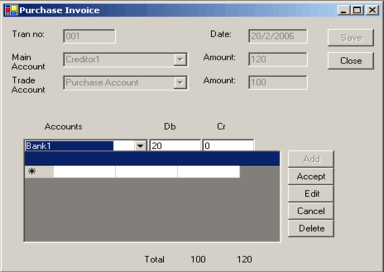
The form below is the Purchase Voucher form. Design all the forms for your project.
Server Side Programming
Server side programming includes Stored Procedures, Triggers, Constraints and Setting Relationships. In this project you are expected to master these three key server side programming techniques.
List all Stored Procedures and their functionality
Refer the book and fill up the table.
Naming Conventions for Classes
Class names should clearly indicate the entity that it represents. For example, the name of the class that represents a account should be named 'Account'.
Naming Conventions for Controls
Label-lblCControlName
Text box - txtControlName
Button-cmdControlName
List box -lstControlName
Combo box - cmbControlName
Radio button - rbControlName
Check box - cbControlName
Naming Conventions for Variables
Integer -intVarName
Long -lVarName
Decimal -dVarName
String - strVarName
Boolean -bVarName
Class modules
We will develop a Class for handling the data. A Class is a collection of abstract objects that share common characterstics. The Tran class we will develop, represents the transactions. Objects of this class are Purchase Voucher, Sales Voucher, etc.
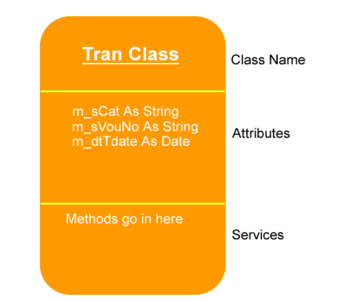
The diagram below is a pictorial representation of a Class Template. There are three parts. The first part represents the name of the class, the second represents the member variables, and the third represents the methods. Refer the book and complete the class template diagram.
Standard modules
All common functions and sub procedures are located in the Standard modules. The table below lists the name and purpose of each standard module.
Validations to be Performed
List of validations to be performed in Accounts form is shown below. Refer the book and complete.
Accounts Form
Purchase Form
You are expected to devise testing routines for each of the feature of the software you will develop. A table has to be prepared which includes Input column, and Output column.
Suggested Enhancements
If you have any suggestions, write to us and your name will appear, with due acknowledgement of your suggestion.
Conclusion
To be filled by the programmer.
For this project you will develop an Accounting Database Application using visual basic .Net and SQL Server. Note that you can easily transfer the same logics to an Oracle - visual basic Application. Accounting Module is the core module of ERP software and by choosing this project you will have covered an important part of ERP software.
In this page you will find all the major topics required to complete your project. You will also find brief explanations and examples for each topic to help you go ahead. The Accounting software you will develop will be ready for commercial use and the enterprising among you can think of using this knowledge for gainful purposes.
We will consider the ABC company for doing this proejct. This company is a service company with trading activities. All typical events which are common to any service company occur in this company too. They can be buying of goods, selling of goods, paying of rent, advance tax payment, debtors, creditors, income, expenses, bank accounts, etc.
The management of the company requires all typical financial statements like Trial Balance, P and L Statment, Registers, etc.
Goals
- Design and program a visual basic, SQL Server Application for the Windows platform.
- The application should work on a Client/Server environment.
- SQL server should be installed on the server with all the appropriate rights and permissions.
- The client application should be installed on the windows client.
- The application should be able to accept data from multiple clients and save it on the SQL Server database.
List of Events occurring in a company
Events are business transactions that effect the financial position of a business. Activities or events in a company can be thought of or summarized into transactions. Depending on the activities of a company the types of transactions vary. Some of the events are listed below.- Purchase
- Sale
- Expenses
- Income
- Payment to Creditors
- Receipts from Debtors
List of events occurring and corresponding Transactions
Identify the transactions for each of the events. The exchange of goods or money in any event is recorded using a transaction. Refer the book and identify the transaction for each event and complete the table shown below.| Events | Corresponding Transactions | Features of the transaction |
|---|---|---|
| Purchase | Purchase Voucher | |
| Sale | Sale Voucher | |
| Expenses | ||
| Income | ||
| Payments to Creditors | ||
| Receipts from Debtors |
Data to be recorded in each of the transaction
In each transaction, data like transaction number, date of transaction and other details are recorded. Data to be recorded in a Purchase voucher is shown below. Repeat the same for all the forms.Purchase Voucher
- Transaction No
- Date
- Creditor Account
- Amount to be credited
- Purchase Account
- Amount to be debited
- Freight Account If any
- Amount to be debited
- Narration
Sale Voucher
- Transaction No
- Date
- Debtor Account
Database Design
This application requires three tables. These three tables will allow us to save data from all the transactions and at the same time generate all the reports. By doing this exercise, you will master the various facets of application design and development. The three tables used are:
- Accounts Table
- Group Table
- Tran Table
The diagram below shows the relationship between Accounts table and Tran table.
Refer the book and fill up the table.
Screen Design
For every transaction, a data entry screen has to be designed and programmed. A table showing the fields in each transaction is given below. Refer the book and fill it up. You can also add two more columns - Query used and table used in the query.
| Transactions vs Fields |
Cash Receipt | Cheque Receipt | Cash Voucher | Cheque Voucher | Purchases | Sales |
|---|---|---|---|---|---|---|
| Transaction Number | Yes | Yes | Yes | Yes | Yes | Yes |
| Date | Yes | Yes | Yes | Yes | Yes | Yes |
| Cash/Bank/ Creditor/Debtor |
||||||
| Amount | ||||||
| Purchase / Sale A/c | ||||||
| Amount | ||||||
| Accounts |
The form below is the Purchase Voucher form. Design all the forms for your project.
Server Side Programming
Server side programming includes Stored Procedures, Triggers, Constraints and Setting Relationships. In this project you are expected to master these three key server side programming techniques.
List all Stored Procedures and their functionality
| Name | Purpose |
|---|---|
| IsPayableAc | To Rereive groups and sub-groups of Accounts Payable from Group Table |
| IsReceivableAc | |
| AddNewAccount | |
| NewTransaction |
Naming Conventions for Classes
Class names should clearly indicate the entity that it represents. For example, the name of the class that represents a account should be named 'Account'.
Naming Conventions for Controls
Label-lblCControlName
Text box - txtControlName
Button-cmdControlName
List box -lstControlName
Combo box - cmbControlName
Radio button - rbControlName
Check box - cbControlName
Naming Conventions for Variables
Integer -intVarName
Long -lVarName
Decimal -dVarName
String - strVarName
Boolean -bVarName
Class modules
We will develop a Class for handling the data. A Class is a collection of abstract objects that share common characterstics. The Tran class we will develop, represents the transactions. Objects of this class are Purchase Voucher, Sales Voucher, etc.
The diagram below is a pictorial representation of a Class Template. There are three parts. The first part represents the name of the class, the second represents the member variables, and the third represents the methods. Refer the book and complete the class template diagram.
Standard modules
All common functions and sub procedures are located in the Standard modules. The table below lists the name and purpose of each standard module.
| Name | Purpose |
|---|---|
| GroupConstantsModule | To Populate the Group Table with Chart of Accounts |
| MainSub | Establishing the Connection with Database |
| LinkTransactions |
Validations to be Performed
List of validations to be performed in Accounts form is shown below. Refer the book and complete.
Accounts Form
- Account Code and Account Name cannot be blank.
- Account Code and Account Name cannot be duplicated.
- Parent Group Name should exist in Group Table.
- Amount should be Numeric and positive
Purchase Form
- Transaction Ref should be created automatically
- Transaction Number cannot be blank.
- Transaction Number cannot be duplicated.
- Account should exist in Accounts Table.
- Amount should be Numeric and positive.
- Both Debit side amount and credit side amount should be equal.
You are expected to devise testing routines for each of the feature of the software you will develop. A table has to be prepared which includes Input column, and Output column.
Suggested Enhancements
If you have any suggestions, write to us and your name will appear, with due acknowledgement of your suggestion.
Conclusion
To be filled by the programmer.